> For the complete documentation index, see [llms.txt](https://docs.suvvy.ai/en/llms.txt). Markdown versions of documentation pages are available by appending `.md` to page URLs; this page is available as [Markdown](https://docs.suvvy.ai/en/main-settings/dopolnitelnye-nastroiki/standard-functions.md).
# Standard functions
Standard functions in Savvy are built-in tools that allow the bot to perform specified actions depending on the context of the conversation.
{% hint style="info" %}
Standard functions are automatically executed based on conditions (written in natural language), without the need to create separate actions in the [Workflows](/en/workflows/veb-khuki.md) section or use them instead of directly calling [Knowledge Base](/en/knowledge-base/baza-znanii.md) files in the main instruction.
{% endhint %}
### The following basic standard features are available:
1. Stop Dialogue - a function that allows you to interrupt a conversation.
2. Ignore Message - a function for skipping specific messages from a client or employee.
3. Set Dialogue Tag - add tags to a dialogue to categorize it.
4. Call Manager (Send Notification to Telegram) - a function for initiating the sending of a [notification to Telegram](/en/main-settings/opovesheniya-ot-savvi.md).
### Setting Up Standard Functions
All standard functions have identical settings. When you enable the **Enable Function** option, the **Function Description field** becomes available.
In the **Function Description** field, enter the condition under which the required standard function will be called.
**Example 1**: Stopping the conversation after the client enters their phone number.
What happened in the dialogue:
**Example 2:** We want the bot to remain silent in response to messages consisting solely of emojis, but to send a notification in Telegram when asked to invite a manager.
We write the corresponding instructions:
We see in the conversation that the bot responded to the message containing emoji and text, but ignored the message consisting solely of emoji.
A request to speak with a manager was answered by a Telegram notification.
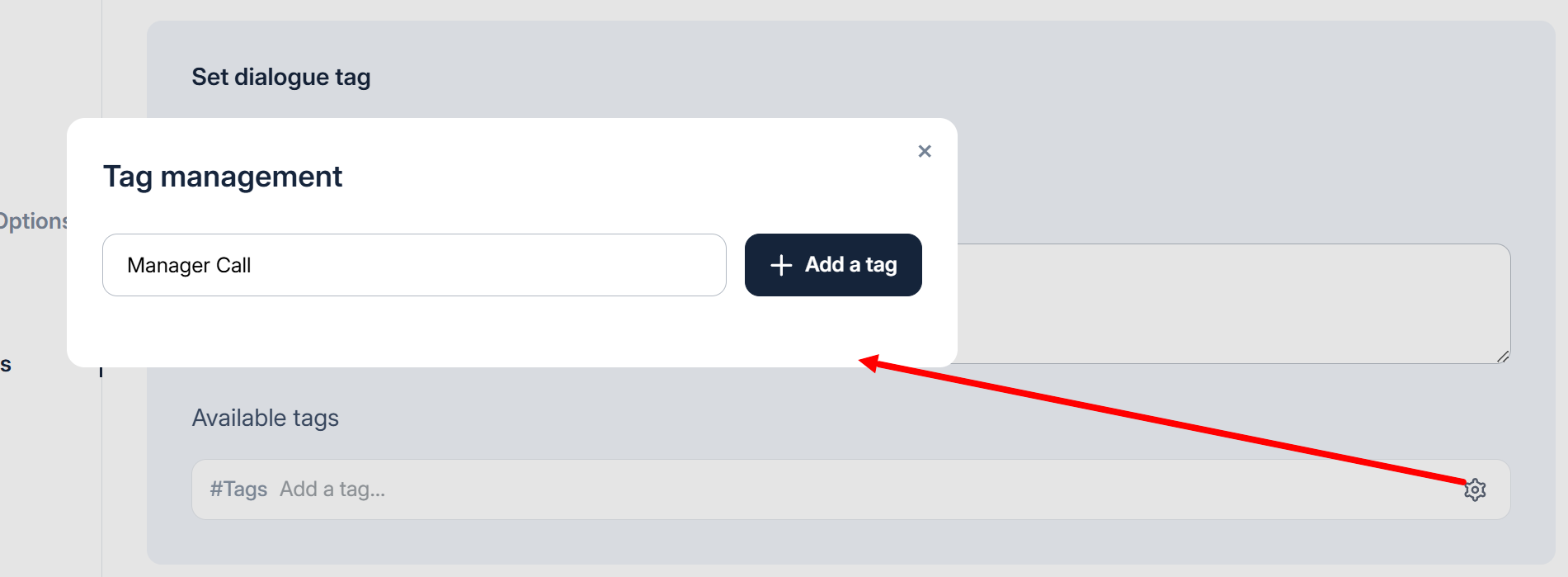
To configure the **standard function: Setting a Dialog Tag**, you must first define or select an existing tag. To do this, click the settings icon in the Available Tags field. In the window that appears, enter a name for the new tag and click **+Add Tag**.
Next, you can select a color for this tag. It will be displayed, for example, in the [Analytics](/en/analytics/analiz-grafikov.md) section's graph.
Select and add the required tag.
In the Function Description field, you must write the function call condition.
{% hint style="warning" %}
If you need to call two standard functions simultaneously, for example, to send a notification to Telegram and set a tag for a conversation when calling a manager, you must call one of the functions in the main instruction or use an Action with a Basic Step.\
Otherwise, only one standard function will be called.
{% endhint %}