> For the complete documentation index, see [llms.txt](https://docs.suvvy.ai/en/llms.txt). Markdown versions of documentation pages are available by appending `.md` to page URLs; this page is available as [Markdown](https://docs.suvvy.ai/en/main-settings/prompts/automatic-generation-of-instruction-and-knowledge-base.md).
# Automatic generation of instruction and knowledge base
Automatic generation helps quickly prepare the bot for operation using AI. Depending on the selected scenario, Suvvy can:
* generate only the instruction;
* generate the instruction and knowledge base files;
* generate only the knowledge base files.
#### When to use
Auto-generation is useful if you:
* are launching a new bot from scratch;
* want to quickly create a draft instruction based on a business description;
* want to immediately prepare a knowledge base from the company’s website;
* want to reduce manual work when initially populating the bot.
{% hint style="warning" %}
At the same time, it is important to remember: the final quality of the Suvvy bot’s performance depends on the quality of the final system instruction, while specific details about products, services, and terms are best placed in the knowledge base.
{% endhint %}
#### Where to find the feature
To use Auto-generation:
{% stepper %}
{% step %}
### Open the required bot.
{% endstep %}
{% step %}
### Go to the Instruction tab.
{% endstep %}
{% step %}
### Click the Generate instruction button.
{% endstep %}
{% endstepper %}
{% hint style="danger" %}
Please note that **tokens are consumed** for website parsing and for generating instructions and Knowledge Base files.
Use of this tool **is charged** according to the platform’s standard pricing. ⚙️💳
{% endhint %}
### Mode 1. Instruction generation
This is the simplest scenario.
#### How it works
You describe:
* [x] what the bot does;
* [x] what role it performs;
* [x] what tasks it should handle;
* [x] how it should communicate with the customer.
After generation, Suvvy creates a system instruction based on your description.
#### When to use
Use this mode if:
* you already have a prepared knowledge base;
* you want to quickly obtain a draft system instruction;
* the company website is not required for generation.
#### Output
The system will create a draft instruction with the bot’s basic behavior logic.
This structure is recommended: sections are separated using # so that the model can more easily understand the boundaries of logical blocks.
### Mode 2. Instruction generation based on description + website link
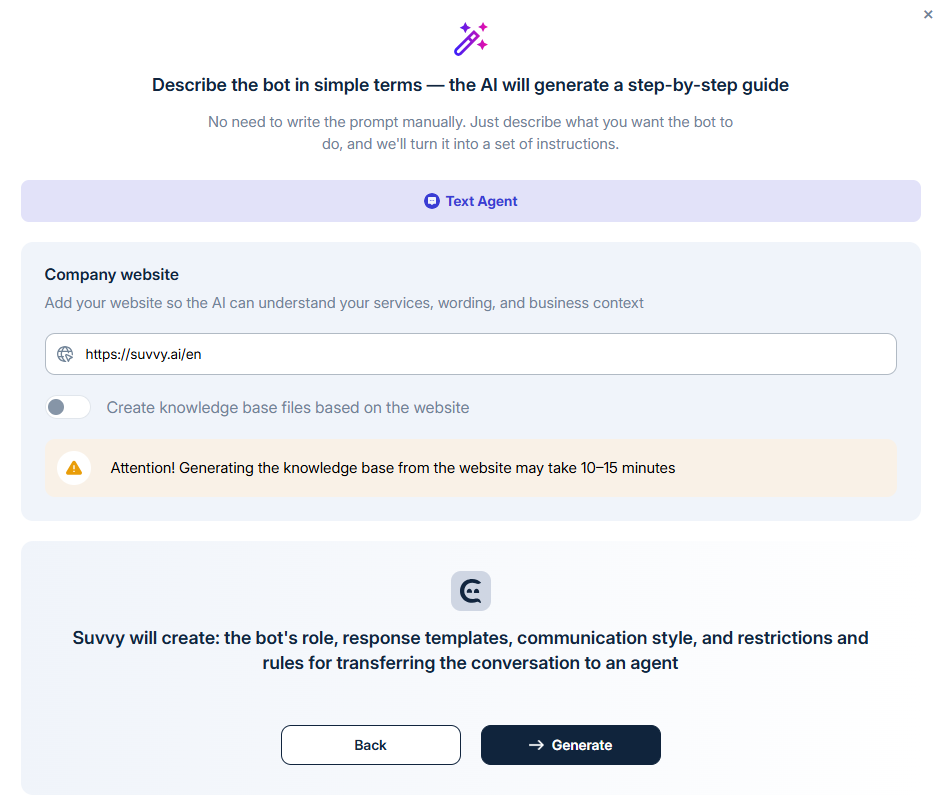
In this mode, you not only describe the bot’s role and tasks, but also provide a link to the website.
Then you go one step forwart and paste your site URL.
#### How it works
Suvvy analyzes the specified website page and uses the information found there when generating the instruction. In this scenario, the provided website page is parsed, after which the system:
* creates the instruction;
* enriches it with facts found on the website;
* adds a “Recommended to move to KB files” section.
#### When to use
This mode is useful if:
* you need to quickly assemble a draft instruction based on a website;
* the homepage already contains a description of the company, its services, and its advantages;
* you want to immediately understand which information is best extracted from the instruction into the knowledge base.
### Mode 3. Instruction Generation + Knowledge Base Generation
This is an advanced mode in which the system prepares two layers of bot configuration at once:
* [ ] a system instruction;
* [ ] knowledge base files.
#### How it works
You paste a website link, after which the system:
* parses the website’s homepage;
* additionally parses other pages of the website and analyzes them;
* generates an instruction;
* creates a set of knowledge base files based on the found materials.
After the generation is complete, the user sees a list of the created files, can review them, mark the ones needed, edit the text inside, and save all of them to the knowledge base at once or selectively.
#### When to use
Use this mode if:
* you are launching a bot from scratch;
* you do not yet have a populated knowledge base;
* the website already contains the main information about the company, products, services, warranties, delivery, working conditions, etc.
#### Output:
1. A ready draft instruction
2. A set of knowledge base files structured according to the website’s content.
### Mode 4. Knowledge Base Generation
In this mode, only knowledge base files are created, without modifying the instruction.
Go to the Knowledge **Base – Direct Questions** section and click **Automatic Generation**.
#### How it works
You provide a website link, after which the system:
* analyzes the root page;
* additionally parses other pages of the site and analyzes them;
* generates only knowledge base files.
#### You can:
* open the file list;
* view the contents;
* edit files before saving;
* select which files to save;
* save all files at once.
#### This mode is convenient if:
* your instruction is already prepared and does not need changes;
* you need to quickly populate or expand the knowledge base;
* you want to update the KB from a website without modifying the system prompt.
### What is recommended to check after generation
{% hint style="warning" %}
Auto-generation saves time, but the result **should always be additionally reviewed** manually.
{% endhint %}
#### Check the instruction
Make sure that:
* the bot’s role is described correctly;
* the goals and tasks do not contradict the real scenario;
* the greeting matches your communication tone;
* the response style fits the task;
* the instruction does not contain unnecessary information that would be better placed in the knowledge base.
#### Check the knowledge base files
Make sure that:
* the files do not duplicate each other;
* the names reflect the content;
* the data is divided into logical topics;
* only genuinely useful materials for responses are included in the knowledge base.
This is especially important for the Direct Questions mode, where search is performed based on meaning and file name, and file names are recommended to be short and clear.
#### Recommendations for use:
* Use instruction generation if you need a quick draft of the bot’s behavior.
* Use instruction + knowledge base generation if you are launching a new bot from a website.
* Use knowledge base generation only if the instruction is already configured manually.
* Always perform a final manual review after generation.
* Everything related to communication rules should be kept in the instruction.
* Everything related to facts, products, services, conditions, and details should be moved to the knowledge base.