> For the complete documentation index, see [llms.txt](https://docs.suvvy.ai/ru/llms.txt). Markdown versions of documentation pages are available by appending `.md` to page URLs; this page is available as [Markdown](https://docs.suvvy.ai/ru/kanaly/khelpdesk-sistemy/usedesk.md).
# UseDesk
UseDesk — омниканальная helpdesk-платформа для автоматизации клиентской поддержки: она объединяет обращения из мессенджеров, соцсетей и почты в одном интерфейсе.
### Подключение UseDesk к агенту в Савви
Заходим во вкладку “**Каналы**”, нажимаем **"UseDesk"**
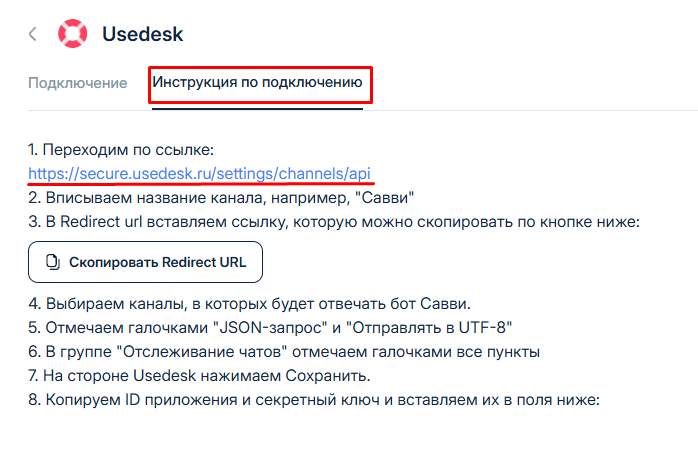
В разделе **Инструкция по подключению** переходим по ссылке
Вписываем **Название канала**
Копируем **Redirect url** с кабинета **Савви** по кнопке ниже:
И вставляем в **Redirect url**
Выбираем каналы, в которых должен работать агент:
Включаем "**JSON-запрос**" и "**отправлять в UFT-8**"
В группе "**Отслеживание чатов**" отмечаем галочками все пункты и нажимаем "**Сохранить**"
Копируем **ID приложения** и С**екретный ключ**
И вставляем во вкладке "**Подключение**" в настройках интеграции в **Савви** и нажимаем "**Подключить**".
В открывшемся окне можно настроить следующие параметры:
* **Email пользователей, которым агент не будет отвечать (через запятую)** - здесь можно указать почту сотрудников либо пользователей, которых добавляем в чёрный список.
* **Выбираем агента, от чьего лица будет отвечать агент** - в это поле можно выбрать сотрудников, которые есть в **UseDesk**.
{% hint style="warning" %}
У сотрудника, **от чьего лица будет отвечать агент**, должны быть включены разрешения для отправки сообщений в выбранные каналы.
{% endhint %}
---
# Agent Instructions
This documentation is published with GitBook. GitBook is the documentation platform designed so that both humans and AI agents can read, navigate, and reason over technical content effectively. Learn more at gitbook.com.
## Querying This Documentation
If you need additional information that is not directly available in this page, you can query the documentation by asking a question.
Perform an HTTP GET request on the following URL with the `ask` and `goal` query parameters:
```
GET https://docs.suvvy.ai/ru/kanaly/khelpdesk-sistemy/usedesk.md?ask=&goal=
```
`ask` is the immediate question: it should be specific, self-contained, and written in natural language.
`goal` is what the user is ultimately trying to achieve, the reason they need the answer. Sharing it helps GitBook give you a better, more relevant answer. A goal is most helpful when it describes the outcome the user wants rather than restating the question. For example, with `ask=how do I create an API token`, a goal like `automate deployments from our CI pipeline` lets GitBook tailor the answer to that use case.
The response will contain a direct answer to the question and relevant excerpts and sources from the documentation.
Use this mechanism when the answer is not explicitly present in the current page, you need clarification or additional context, or you want to retrieve related documentation sections.